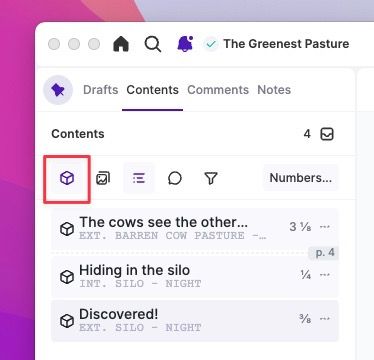
How Do I Focus On A Single Beat?
You can focus on an individual Beat while writing your script. This temporarily hides your other Beats from view so you’re not distracted by other sections of your script.
Focusing on a Single Beat
Section titled “Focusing on a Single Beat”- Right-click on the Beat icon for the section of your script you want to focus on.
- Select
Focus script on beat - Navigate to the lefthand sidebar, and select the “Contents” tab.
- Right click the beat you want to focus on, then select “Focus document on beat.”
Exiting the Beat Focus
Section titled “Exiting the Beat Focus”You can exit this view, and reveal the rest of your script, by selecting “Remove focus.”
Navigating Between Focused Beats
Section titled “Navigating Between Focused Beats”To navigate between focused beats, first focus on a Beat via the instructions above.
Then open the Contents sidebar on the left and select the other Beat(s) you want to focus on.