
How Do I View Script Changes by the Writer Who Made Them?
You can view all your revisions by the writer who made them. The color of the text written by that writer will correspond to the color of their avatar in the top bar.
For your current draft:
Section titled “For your current draft:”Make sure you are looking at your current draft. (If not, click ‘Main Draft’ in the title section.)
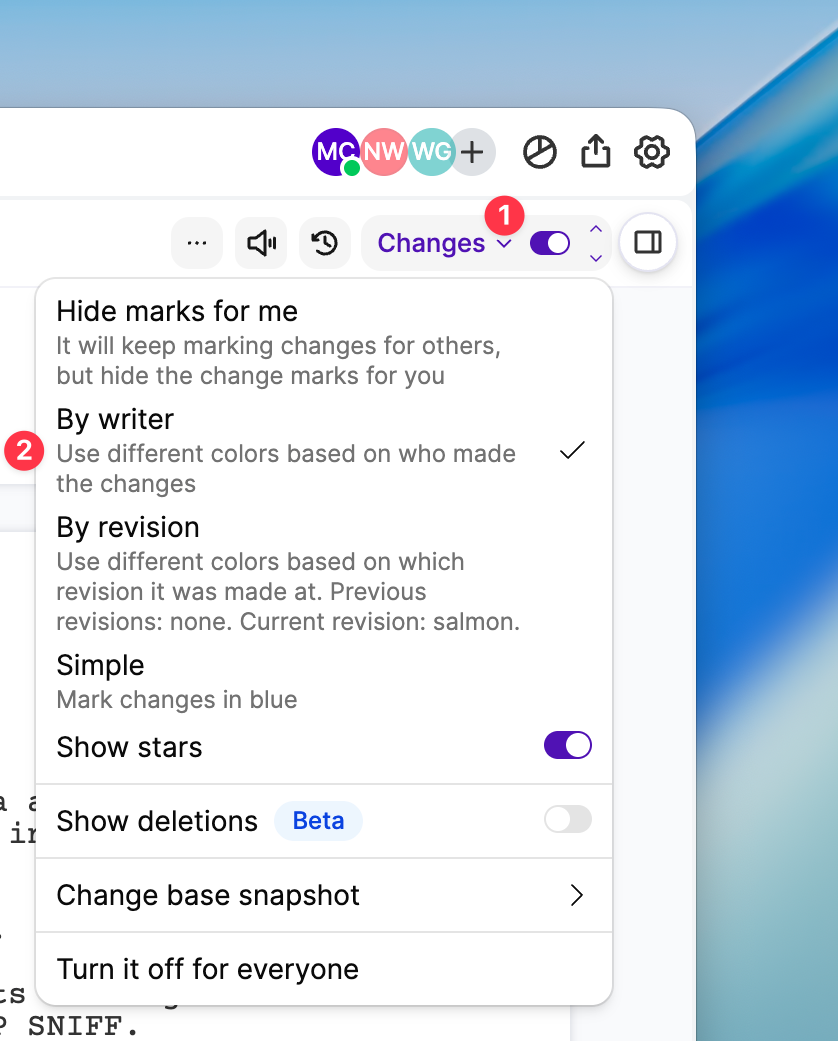
- Click on the ‘Changes’ dropdown menu in the tool bar.
- Select ‘By writer’ in the dropdown menu.
For a previous draft:
Section titled “For a previous draft:”- Click on the desired snapshot in the Drafts sidebar.
- Click on the ‘Changes’ menu in the toolbar.
- Select whether you want to see the changes ‘Made in this snapshot’ or ‘Made since this snapshot.’
- Select ‘By writer’
- Click ‘Apply’