Skip to content
Arc Studio Help Center
Search
Ctrl
K
Cancel
Open Arc Studio
Select theme
Dark
Light
Auto
Menu
Getting Started
Getting Started Guides
Intro to Script Elements
Switching to Arc Studio (For experienced screenwriters)
Quick Formatting, Shortcuts & Keystrokes Guide
Productive Screenwriting
Backing Up Your Script
Advanced Features
Collaboration & Feedback
Draft & Revision Management
Notes App
Table Read
Branch & Merge
Advanced Formatting
The Stash
Script Reports
Outlining
The Plot Board
Season Outlines and Bibles
Production
Production Beta Guide
Scene Numbers
Script Tagging/Breakdown
Scheduling
Shot List and Storyboard
Call Sheets
Crew, Contacts and Email Distro
Classrooms & Teaching
Arc Studio Classroom
Admin and Faculty Resources
Student Resources
More
"How To" Articles
All How Tos
Account Management
Account Management
How Do I Reset My Password?
What is My “One Time Password”?
How Do I Add Credits?
How Do I Add Members to My Team Account?
How Do I Cancel My Account?
How Do I Change My Display Name?
How Do I Change the Email Address for My Account?
How Do I Claim a Coupon or Promo Code?
How Do I Clear Arc Studio App Data?
How Do I Connect My Google or Apple Accounts?
How Do I know if my Mac has Intel Processor or Apple Silicon?
How Do I Log Out On All Of My Devices?
How Do I Purchase a Gift Subscription?
How Do I Redeem a Gift Subscription?
How Do I Turn on Image Generation?
How Do I Update My App?
How Do I Update My Payment Info?
How Do I Set Up Two-Factor Authentication?
Outlining
Outlining
How Do I Navigate to the Plot Board?
How Do I Access My Beat Inbox in Script View?
How Do I Access My Beats in Script View?
How Do I Access My Story Arcs?
How Do I Add a Structure Role to a Beat?
How Do I Add Acts to the Plot Board?
How Do I Add an Icon Photo to a Character Story Element?
How Do I Add and Remove Beats from the Beat Inbox?
How Do I Add Beats in Outline View?
How Do I Add Beats to the Plot Board?
How Do I Add Images to a Story Element?
How Do I Add Images to Beats?
How Do I Change the Color of a Storyline or Character Story Element?
How Do I Change an Act Name?
How Do I Connect a Beat from the Beat Inbox to a Scene?
How Do I Connect a Beat to a Scene?
How Do I Connect Multiple Beats to a Scene?
How Do I Create a New Beat for a Scene?
How Do I Create Or Delete a Character Story Element?
How Do I Create or Delete a Location Story Element?
How Do I Create or Delete a Storyline Element?
How Do I Create Outlining Templates?
How Do I Delete a Beat Comment on the Plot Board?
How Do I Delete Beats in Outline View?
How Do I Disconnect a Beat from a Scene?
How Do I Edit A Beat’s Name and Description?
How Do I Edit My Story in Outline View?
How Do I Edit or React to Beat Comments on the Plot Board?
How Do I End A Sequence on the Plot Board?
How Do I Export My Outline as a PDF or text file?
How Do I Filter Beats on the Plot Board?
How Do I Generate an Image for a Beat?
How Do I Generate Story Element Images?
How Do I Highlight My Key Beats?
How Do I Include Multiple Scenes in a Beat?
How Do I Isolate a Single Storyline in Story Arcs?
How Do I Jump From a Beat on the Plot Board to that Scene in the Script?
How Do I Make a Sequence of Beats on the Plot Board?
How Do I Mark and Unmark Key Beats?
How Do I Move a Sequence on the Plot Board?
How Do I Move Acts on the Plot Board?
How Do I Move Beats in Outline View?
How Do I Move Beats on the Plot Board?
How Do I Move Multiple Beats On the Board At Once?
How Do I Remove a Sequence Marker?
How Do I Remove Act Breaks From the Plot Board?
How Do I Remove Act Breaks in Outline View?
How Do I Remove Beats From the Plot Board?
How Do I Reply to or Resolve Beat Comments on the Plot Board?
How Do I Select A Beat Template for the Plot Board?
How Do I Share Custom Outlining Templates?
How Do I Start Writing a Scene So It Connects to Its Beat?
How Do I Tag and Untag Beats with Story Elements?
How Do I Tag Beats with Story Elements in Outline View?
How Do I Toggle Outline Views?
How Do I Turn a Note Into a Beat?
How Do I View or Add Comments to a Beat on the Plot Board?
How Do I Visualize a Storyline with Story Arcs?
History
History
How Do I View My Draft History?
How Can I Tell If I’m Looking At an Old Draft?
How Do I Change the Revision Color or Name?
How Do I Change Which Draft Changes Are Being Marked From?
How Do I Compare an Old Draft to the Current Draft?
How Do I Export My Script as a PDF?
How Do I Export A Selection from My Script As a PDF?
How Do I Export My Script as a Final Draft™ File?
How Do I Export My Script as a Text Document?
How Do I Print My Script?
How Do I Remove a Revision?
How Do I Stop Tracking Changes?
How Do I Take a Snapshot?
How Do I Turn an Autosave Into a Snapshot or Colored Revision?
How Do I View All The Script Changes In One Color?
How Do I View Script Changes By the Revision They Were Made In?
How Do I View Script Changes by the Writer Who Made Them?
How Do I View the Changes Made In an Old Draft?
How Do I View the Changes Made Since an Old Draft Was Filed?
How Do I Browse Changes?
How Do I Create a Branch Copy?
Feedback and Collaboration
Feedback and Collaboration
How Do I Invite Collaborators to Work on My Script?
How Do I Change the Comment Tag Color?
How Do I Create a Private Version of My Draft?
How Do I Delete a Comment Tag?
How Do I Highlight Text in the Script?
How Do I Tag and Untag Comments?
How Do I Make Comments?
How Do I Notify/Mention my Co-writers When Commenting?
How Do I Refresh Comments List?
How Do I Remove a Collaborator or Myself From a Shared Script?
How Do I Rename a Comment Tag?
How Do I Reply to Comments?
How Do I Resolve Comments?
How Do I Sort by Comments that Only Mention Me?
How Do I Sort by Resolved Comments?
How Do I Sort Comments by Tag?
How Do I Sort Comments by Writer?
How Do I View and Cycle Through My List of Comments?
How Do I View Comments by Date or Page?
How to Invite People to a Project
How Do I Create a Zoom Meeting for a Script?
Document & Script Management
Document & Script Management
How Do I Access My Autosaves?
How Do I Add a Watermark to My Exported PDF Script?
How Do I Add and Remove Dialog Numbers?
How Do I Add Images To My Script?
How Do I Add Scene Numbers to Non-Scenes?
How Do I Archive Or Delete My Script?
How Do I Back Up My Files Locally?
How Do I Back Up My Files to Google Drive?
How Do I Start Tracking Changes?
How Do I Change From Film to TV Formats?
How Do I Change the Font for my PDF Export?
How Do I Change the Script Author?
How Do I Create a New Script?
How Do I Duplicate My Script?
How Do I Edit My Script Information?
How Do I Edit My Title Page?
How Do I Edit Offline?
How Do I Add and Remove Scene Numbers?
How Do I Export A Page Range As a PDF?
How Do I Focus On A Single Beat?
How Do I Hide Change Marks for Myself?
How Do I Hide Marked Changes?
How Do I Import Different File Formats?
How Do I Insert Lyrics Into Character Dialogue?
How Do I Lock My Script Pages?
How Do I Manually Change Scene Numbers?
How Do I Mark a Change As Revised?
How Do I Reset my Cache?
How Do I Unarchive My Script?
How Do I Unlock My Script Pages?
How Do I Use the Quick Commands Palette?
How Do I View All My Scripts?
How Do I View My Archived Scripts?
How to Enable Revert Mode
How to Remove a Snapshot
When and Where are Backups Made?
Editing, Format and Layout
Editing, Format and Layout
How Do I Edit Headers and Footers?
How Do I Change the Script Flow?
How Do I Add Alternate Text?
How Do I Add an External Link in My Script?
How Do I Add Continued to Page Breaks within Scenes?
How Do I Add Custom Times Of Day to the Scene Heading Auto-Completer?
How Do I Add Intro Pages?
How Do I Add Page Numbers to My Headers or Footers?
How Do I Customize Script Elements?
How Do I Adjust the Page Layout?
How Do I Apply A Format Template to an Existing Script?
How Do I Change Advanced Settings for Searching and Replacing?
How Do I Change the Default Spell Check for My Account?
How Do I Change the Font in the Editor?
How Do I Change the Spacing of Scene Headings?
How Do I Change the Spell Check Language?
How Do I Change the Spelling to One of the Suggested Spellings?
How Do I Change the Text Color?
How Do I Check Spelling of My Whole Document?
How Do I Create a Dual Dialogue Element?
How Do I Create a Line Break?
How Do I Create a New Spelling of A Word?
How Do I Create a Script Format Template?
How Do I Create Custom Script Elements?
How Do I Delete From the Stash?
How Do I Edit a Stash Entry?
How do I enable page breaks in the middle of a dialogue or action sentence?
How do I enable/hide the popup formatting palette?
How Do I Exit Out of the Spell Check?
How Do I Find and Replace Words in My Script?
How Do I Force Open the Elements Menu?
How Do I Change the Margins Of A Specific Paragraph?
How Do I Insert a Page Break?
How Do I Manually Install Spell Check Dictionaries?
How Do I Move From My Stash To My Script?
How Do I Pause Spell Checking my Document?
How Do I Rename an Item in the Stash?
How Do I Replace All Instances of a Word in my Script?
How Do I Replace One Instance of A Word?
How Do I Search the Knowledge Base?
How Do I Set My Sluglines to Bold?
How Do I Show CONT’D When a Character Has Another Line?
How Do I Show Headers and Footers On the First Page?
How Do I Stash a Section of My Script?
How Do I Remove a Character From the Autocompleter?
How Do I Turn on Spell Check
How Do I Tweak My Page Count Automatically?
How do I undo an action on the mobile app?
How Do I View Unassigned Scene Numbers?
How to Turn Off macOS Text Replacement
How to Use Selection Tools on Mobile App
Viewing Settings
Viewing Settings
How Do I Make the Formatting Palette Fixed on the Screen?
How Do I Use The Timer?
How Do I Show My Script's Word Count?
How Do I Use Focus Mode?
How Do I Use Nag Notifications?
How Do I Stop Writing in Focus Mode?
How Do I Turn on Night Mode?
How Do I Zoom In or Out?
Notes & Research
Notes & Research
How Do I Access My Notes?
How Do I Change the Title of a Note?
How Do I Create A Note From a Template?
How Do I Create a Note On a Beat?
How Do I Create a Note?
How Do I Create a README Note?
How Do I Create Note Categories?
How Do I Delete a Note?
How Do I Generate an Image for a Note?
How Do I Import a Template Into a Note?
How Do I Link My Notes?
How Do I Make a Note Fullscreen?
How Do I Make An Existing Note a README Note?
How Do I Pin a Note to the Top of My Notes List?
How Do I Resize My Note Window?
How Do I Save a Note as a Template?
How Do I Use the AI Research Assistant?
Projects and Folders
Projects and Folders
How Do I Access Project Security Settings?
How Do I Add Watermarks to Script Exports from a Project?
How Do I Create a Folder in a Project?
How Do I Create a Project?
How Do I Create a Script In a Folder
How Do I Create A Script In a Project?
How Do I Delete a Folder?
How Do I Enforce Watermarks on the App Display?
How Do I Manage Collaborator Access Levels on a Project?
How Do I Manage Who Can Export Scripts From a Project?
How Do I Move a Script into a Folder?
How Do I Move a Script Into a Project?
How Do I Rename a Folder?
API Reference
Get Started
Introduction
Quickstart
Authentication
Overview
Data model
Overview
Endpoints
List scripts
Get script
List snapshots
Get snapshot
Get snapshot document
Get latest document
Why Switch to Arc Studio?
AI FAQ
Open Arc Studio
Contact support
Open Arc Studio
Select theme
Dark
Light
Auto
How Do I Add an Icon Photo to a Character Story Element?
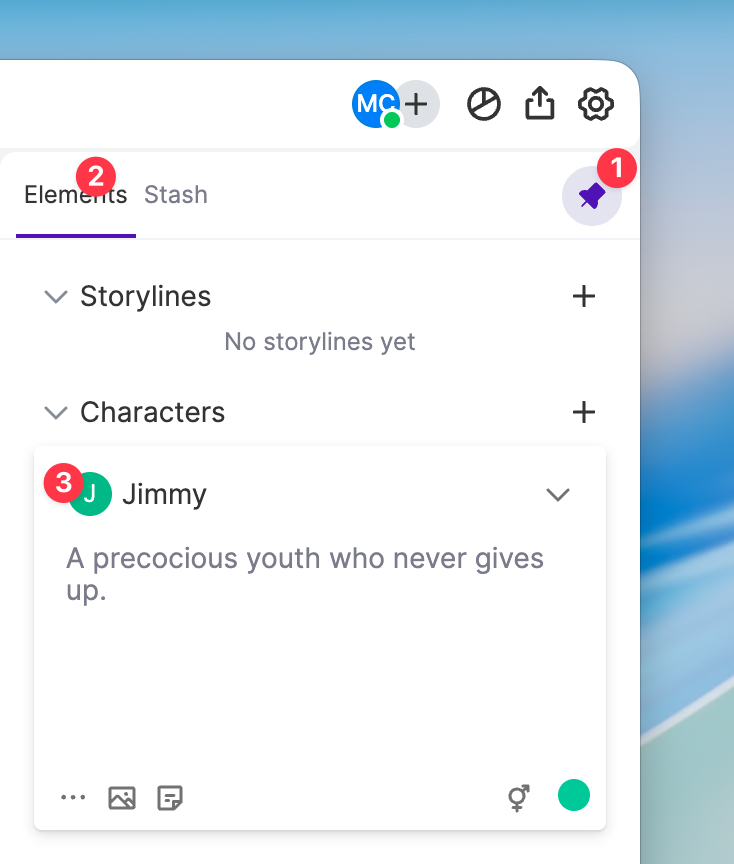
Access your Story Elements by pinning open the right sidebar
Select
Elements
Click on the color circle to the left of the character’s name.
Select a photo from your computer.